VoIP
VoIP  Blog
Blog  Business Communication
  Customer Experience
  Leadership
  Marketing & Sales
  Nextiva News
  Productivity

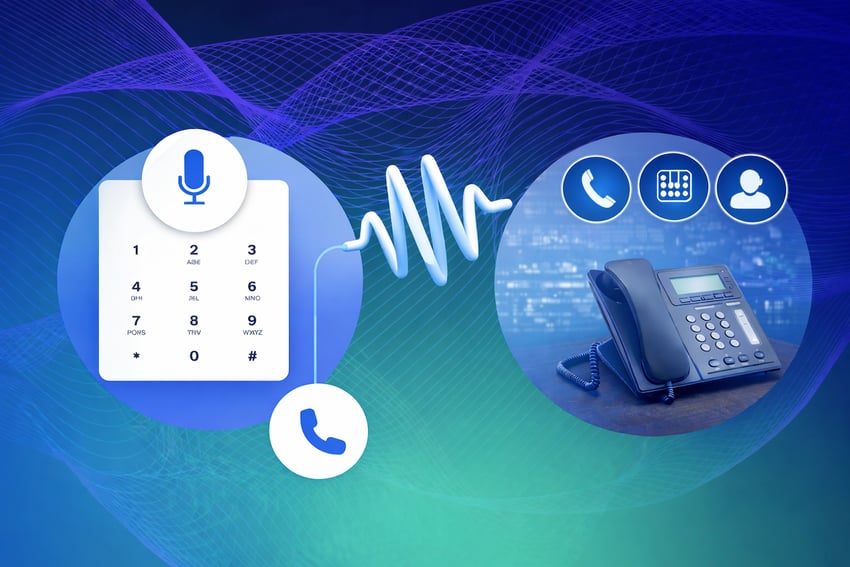
IVR — or interactive voice response — is the automated phone menu system that greets callers and routes them to the right department without a live agent. If you’ve ever pressed 1 for sales, you’ve used an IVR service.
For businesses, an interactive voice response setup is far more than just an automated answering tool: it’s one of the very first operational touchpoints when a customer reaches out to your brand. This makes it a critical communication tool that drives and defines your broader customer service experience (CX). To build a highly effective, frictionless customer lifecycle, teams must understand the mechanics behind this technology to map clear, user-friendly customer communication journeys that keep callers engaged.
IVR Full Form: What Does IVR Stand For?
IVR stands for interactive voice response.
Breaking down the acronym explains its primary components:
- Interactive: The system establishes a synchronous, two-way communication loop with the user.
- Voice: It delivers audio prompts using pre-recorded human speech files or cloud-hosted text-to-speech (TTS) synthesis engines.
- Response: It captures and interprets data inputs by the caller via their voice or telephone keypad.
What Is an IVR System?
An IVR system is an automated telecommunications technology that routes phone calls, captures customer data, and executes automated workflows based on caller input. It serves as the interface for your telephone network and uses tailored menu options to direct incoming inquiries to the appropriate resources.
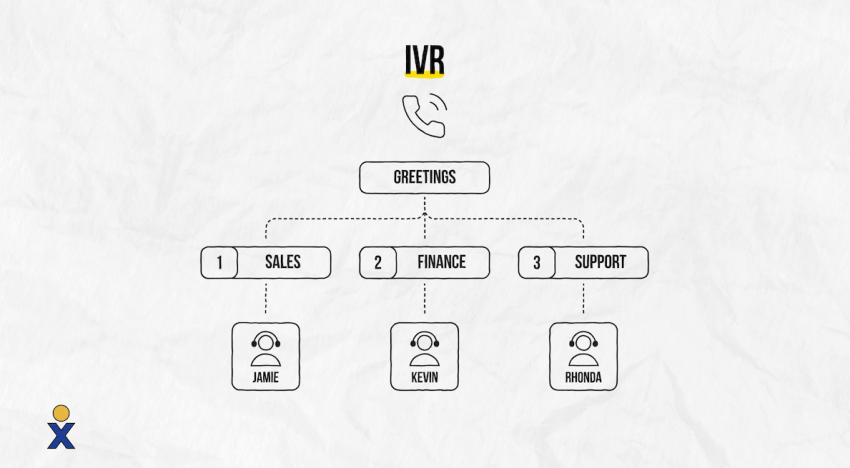
An enterprise-grade IVR service allows businesses to:
- Autonomously handle, screen, and route high volumes of incoming calls
- Provide seamless self-service portals for routine operational tasks
- Capture verified customer data (such as account numbers or tracking numbers) before a representative takes the call
- Perform automated database queries to provide callers with personalized information
IVR handles recurring, standard inquiries without human intervention, and works as a highly efficient virtual receptionist. This reduction in workload allows your support team to focus on complex customer issues, optimizing company resources and daily business operations.
Types of IVR Services
Different communication scenarios require specific system configurations. Selecting the right IVR model depends on your target audience’s technical preferences and your call center’s structure.
- Keypad-based navigation (DTMF): The telecommunications standard. Callers navigate menu structures by pressing digits on their phone keypad. The system identifies the selection using Dual-Tone Multi-Frequency (DTMF) signaling.
- Voice-based interaction: This method employs automated speech recognition systems, allowing callers to state their choices naturally (e.g., “Accounting”) and navigate hands-free.
- Visual IVR: Shifts voice-based communication to digital user interfaces. The system sends a secure web link to the caller’s smartphone, enabling them to select options from a clear visual menu.
- Outbound IVR: A proactive system solution for automatically contacting customers — for instance, to provide appointment reminders, shipping status updates, or immediate fraud alerts.
Cloud-based solution vs. on-premises installation: Virtual, cloud-hosted phone systems can be rapidly deployed via VoIP infrastructure, eliminating the maintenance costs associated with local hardware servers. In contrast, on-premises solutions require physical telephony cards, dedicated lines, and ongoing internal IT support.
Traditional IVR vs. Conversational AI IVR
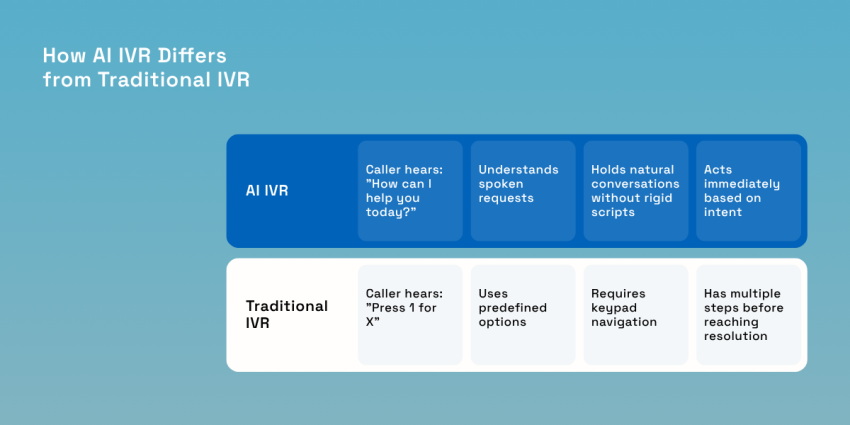
Businesses are moving away from rigid, multi-level menu structures in favor of agile systems based on advanced processing logic. Here are some key differences between a traditional and an AI IVR.
| Feature | Traditional IVR | Conversational AI IVR |
|---|---|---|
| User input tracking | Hard touch-tone keypad numbers (DTMF). | Natural speech pathways using NLP processing. |
| System flexibility | Restricted to a rigid, pre-defined menu tree. | Dynamically adapts to variable user intentions. |
| Customer experience | Structural, robotic, and highly mechanical. | Conversational, smooth, and dialogue-driven. |
| Data personalization | Minimal out-of-the-box customization options. | Cross-references live CRM records to tailor responses. |
Try the best AI answering service free for 14 days
XBert AI answers questions and captures leads. Add your 24/7 answering service in minutes.
How Does an IVR System Work?
An active IVR communication path uses a streamlined process to interpret input, confirm data, and execute target tasks behind the scenes.
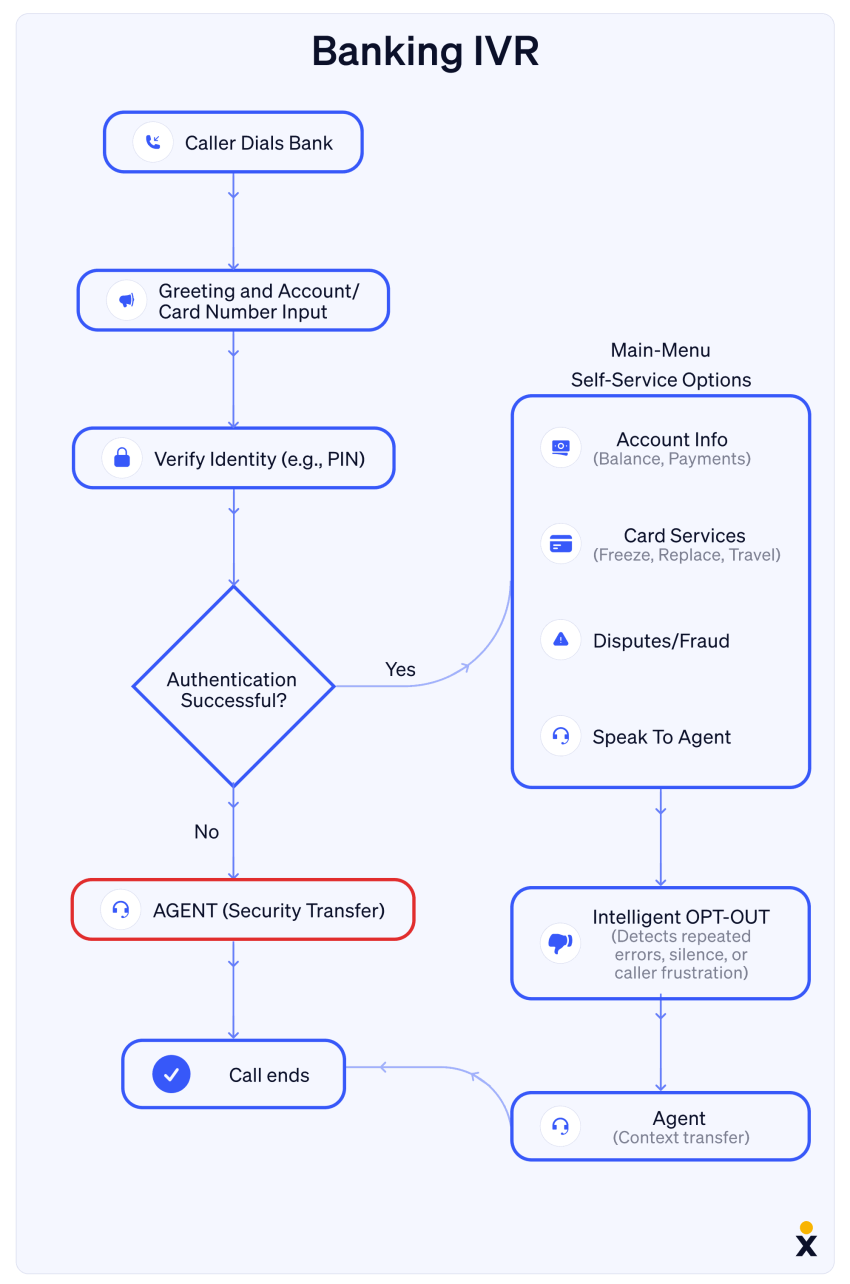
1. Welcome greeting and input capture
When a customer dials your number, the platform automatically picks up and plays a standardized welcome greeting. The system then outlines a list of menu options using pre-recorded files or high-definition text-to-speech software. The caller interacts with this interface by pressing a number or speaking their intent.
2. Signal recognition (DTMF or NLP)
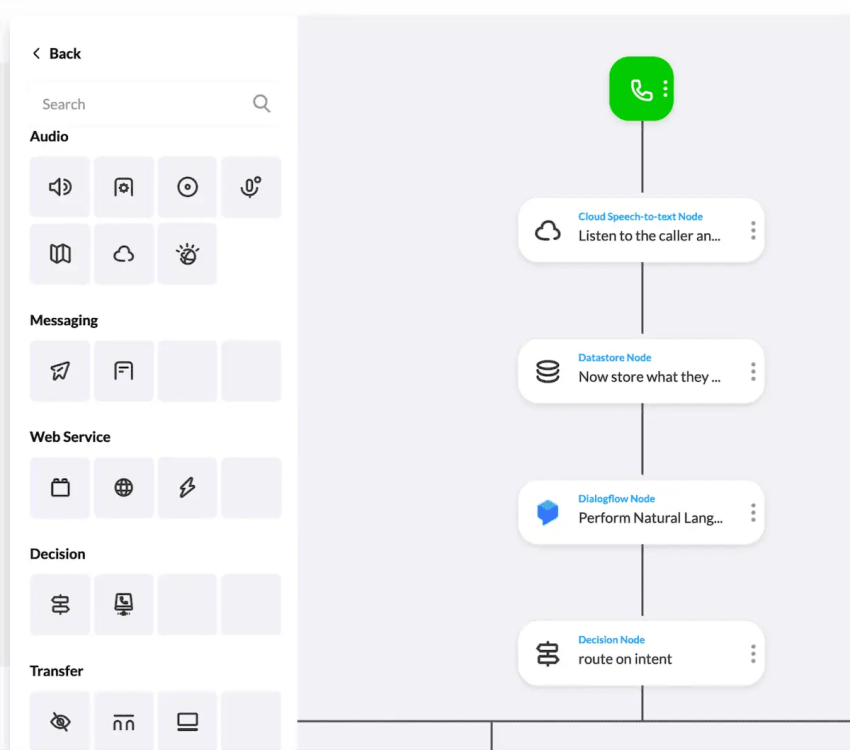
If the caller uses their keypad, the IVR system captures the unique sound frequencies generated by the touch-tone buttons. If the architecture uses voice recognition, a natural language processing (NLP) engine parses the speech audio, translates it into text data, and identifies the core intent of the user.
3. Database lookup and information retrieval
Once the selection is confirmed, the IVR can execute an automated database query — frequently called a data dip — by communicating directly with your internal CRM, helpdesk, or billing software. This allows the system to pull real-time account data (like a bank balance, delivery status, or booking confirmation) and read it back to the caller without loops or human intervention.
4. Smart call routing and escalation
If the query requires a human touch, the system triggers intelligent routing paths to transition the session. It passes the customer over to your automatic call distribution (ACD) engine, matching the caller with an available agent who holds the exact skill set required to resolve the issue.
IVR vs. Auto Attendant vs. ACD vs. CTI
While these four communication terms are used interchangeably, they perform different tasks within a business communication stack.
| Area | IVR | Auto Attendant | ACD | CTI |
|---|---|---|---|---|
| Main goal | Automated self-service and smart caller data collection. | Simple, structured incoming call routing. | Managing high volume by queueing traffic dynamically. | Linking your phone system directly with computers. |
| User interaction | Two-way communication using voice or keypad commands. | One-way path using static keypad navigation choices. | No direct customer contact; manages background queues. | Works invisibly in the background to sync data fields. |
| System intelligence | High capability backed by AI database access. | Low intelligence restricted to a fixed menu layout. | Medium capability using agent skill-set distribution rules. | High technical skill; bridges telephony and software. |
| Data integration | Links natively with your central CRM or database. | No data lookups or external system connections. | Monitors live agent availability metrics. | Launches context-rich screen pops with client records. |
| Best for | Processing secure payments, identity verifications, or lookups. | Small offices requiring a clean, professional welcome. | Customer support operations handling multiple queues. | Personalizing the active live support agent experience. |
Benefits of Using an IVR System
Deploying an integrated IVR service offers many advantages across both business operations and customer satisfaction metrics.
For businesses:
- Improved customer service: IVR offers 24/7 availability, reduces wait times, and directs incoming callers to the right agent, leading to a more efficient and satisfying customer experience.
- Reduced operational costs: Automating routine tasks frees up call center agents to handle more complex inquiries, saving businesses on operational expenses.
- Increased productivity: Agents can focus on resolving complex issues while the IVR handles simple questions, which improves efficiency.
- Data-driven insights: IVR analytics provide valuable data on customer behavior and call trends, allowing businesses to make informed decisions regarding their communication strategy.
- After-hours call handling: An IVR lets you provide a distinct call flow outside of business hours. The after-hours IVR menu can exclude the ability to talk with an agent and instead encourage callers to leave a voicemail or call back during regular business hours.
- Scalability: IVRs adjust to handle varying call volumes without hiring more staff. You can expand it to include more options and functionality as your business grows.
For customers/callers:
- Faster service: IVR allows callers to get information or resolve basic issues quickly without waiting on hold.
- 24/7 availability: Callers can access customer information or self-service options outside of regular business hours.
- Convenience: IVR provides a user-friendly way for customers to get what they need without requiring interaction with a live agent.
- Multilingual support: Advanced IVR systems can offer options in multiple languages, catering to a broader customer base.

Common IVR Applications & Use Cases
IVR systems have become imperative for most businesses, serving a wide range of purposes across various industries. Let’s look at some of the most common uses of IVR systems.
1. Financial services and banking
Banks use an interactive voice response system as digital assistants to help customers perform various functions like checking their account balance, making payments, or reporting a lost card without having to wait for a human representative.
Need to know if that check cleared? Just punch in your account details, and the IVR will give you a rundown of recent transactions. It’s like having a 24/7 teller at your fingertips, minus the small talk.
2. Healthcare and appointment scheduling
IVRs help healthcare providers streamline patient services. Gone are the days of waiting on hold to book a doctor’s visit.
Now, customers can schedule, confirm, or cancel appointments with a few button presses. Some systems even handle prescription refill requests or provide basic health information. It’s not quite a robot doctor, but it’s a handy first point of contact for many simple medical needs.
Veterans Home Care, for example, uses Nextiva’s IVR to serve its at-risk veterans.

“We are looking at doubling our business over the next couple of years. That’s a lot of people to talk to. We plan to leverage the IVR technology to prioritize where we spend our time and who we talk to.”
~ David Laiderman

3. Logistics, shipping & utilities
Whether tracking a package or reporting a power outage, IVR systems are extremely convenient.
Shipping companies use them to provide real-time updates on deliveries, while utility providers rely on IVR to manage service disruptions. Say it’s 2 AM, and the power goes out. With IVR, customers can report the issue and get status updates without waking up a call center employee.
4. Customer service and account management
IVR systems have become integral to customer service operations across various industries, from telecom providers to retail stores.
When customers call in, IVRs can quickly authenticate their identity using account numbers or personal information. Once verified, callers can access a variety of self-service options, including:
- Resetting passwords or PINs
- Updating personal information (address, phone number, email)
- Checking account balances or recent transactions
- Making payments
- Reviewing order status or delivery information
- Requesting product information or technical specifications
You can even integrate your IVR with other business systems (workforce management tools, payment processing, customer relationship management systems) to create a more efficient, personalized experience for your customers while optimizing your operations.
5. Travel and hospitality
Airlines use an interactive voice response system for flight status updates and booking modifications, while hotels employ it for reservations and information about amenities. An IVR system makes it easy for customers to check flight times or find out more details about an accommodation.
As the technology continues to evolve, we can expect these digital assistants to become even more capable and user-friendly.
6. Government agencies
When calling local, state, or federal government offices, callers are greeted with important announcements and can access a range of self-service options.
For example, California’s IVR offers services like:
- Requesting birth certificates
- Getting information on laws, regulations, or public projects
- Locating nearby schools or farmers’ markets
- Filing for unemployment or disability
- Registering to vote
- Applying for licenses or health coverage
If self-service can’t fulfill a request, callers are connected to appropriate agents based on their selection. For complex situations, some agencies may use a dedicated operator to triage requests.

How to Design an Effective IVR System
A confusing menu structure will drive your customers away. When mapping out your system architecture, implement these six design principles for a friction-free caller journey:
- Use action-oriented scripts: Structure your voice prompts using the “Action ➔ Object ➔ Digit” format. Say “Press 3 to check your invoice status” instead of “Press 3 if you have questions about your invoice.” This prevents callers from forgetting the target digit before the option announcement finishes.
- Keep menu options concise: Limit the main menu to three or four clear choices. Too many branches overwhelm callers cognitively; this often leads them to hang up or press keys at random to escape an endless loop.
- Provide a transparent way out: Never hide your service agents. Ensure direct and easy access to a human representative at any time (e.g., “Press 0 at any time to speak with an agent”).
- Use real-time automated callbacks: Offer an automated callback option during high call volumes to respect callers’ time. This maintains high customer satisfaction even during long wait times.
- Use dynamic CRM data: Link your telephony system directly to your central database. When an existing customer calls, the system should immediately recognize the number, skip generic greeting menus, and offer options tailored to open support tickets or recent purchases.
- Conduct thorough stress tests: Regularly review your internal routing workflows. Navigate through every menu path yourself to ensure there are no dead ends, logical loops, or faulty redirects that leave callers stranded in silence.
Hear why XBert AI is the best AI receptionist
XBert AI receptionist handles customer questions, captures leads, and books appointments. Try it free for 14 days.
Challenges When Using an IVR (+ Solutions)
Implementing an IVR system can present several challenges, but with the right approach, you can effectively address them.
Here are a few challenges you might come across.
1. Team morale & agent performance
Your employees may voice their fears that the IVR application in the workplace may lead to unemployment.
Solution: Position IVR as a tool to enhance, not replace, human agents. Make it clear that you’re using it to streamline simple requests in order to free up agents for more personalized customer interactions. This leads to more engaging work and improved job satisfaction, which can actually boost agent morale and performance.
2. Navigation complexity
An overly complex IVR menu can frustrate callers, leading to hang-ups and dissatisfaction.
Solution: Simplify call flow navigation. Design direct routes with minimal steps, and make sure they effectively address customer needs. Regularly review and optimize your IVR structure using contact center analytics. If you’re a small business, fewer menu options are better. Your IVR will likely be one layer (the term for the number of menus you offer callers).
Learn more: Creating a Phone Menu in Nextiva
3. Impersonal customer service
The lack of human touch in IVR interactions can be off-putting for some customers.
Solution: Always provide clear options to speak with a human agent. Consider implementing voice recognition to allow callers to request an agent verbally.
4. Excessive wait times
Poor call routing can lead to long wait times, starting customer interactions on a negative note.
Solution: Use data analytics to identify and address bottlenecks in your call flow. Implement callback options like Q-for-Me (shorthand for “queue for me”) to respect customer time and reduce frustration during peak periods.
5. Continuous improvement
When a caller presses 6 for accounts, and they wind up in sales, you’re only going to frustrate them and waste their precious time. This means your IVR system needs ongoing attention.
Solution: Regularly track key call center metrics like most-used options, average hold times, and success rates. Make incremental improvements based on this data, and communicate significant changes to frequent callers.
How to Measure Success and Optimize Your IVR
A hands-off approach creates menu fatigue and frustrates callers. You need to track performance to keep your IVR running smoothly. With advanced reporting and voice analytics in Nextiva’s Engage plan, you can monitor call flows in real time and spot issues early.
Key metrics to track
- Customer satisfaction (CSAT): Trigger a short survey through your IVR right after each interaction to gather immediate feedback.
- Self-service completion rate: Track how many callers resolve their issues without speaking to an agent. A higher rate signals that your IVR handles requests effectively.
- Average handle time (AHT): A well-structured IVR collects key details upfront, which helps agents resolve issues faster and reduce call duration.
- Menu drop-off rate: Pinpoint the exact prompt where callers disconnect. This helps you fix confusing or time-consuming menu paths.
Businesses using the Power Suite CX plan improve their IVR without constant manual effort. AI-driven transcription and summarization review every interaction and highlight gaps in your menu structure. When the system detects repeated requests for a service not listed in your menu, you can update your flow immediately to match real customer needs.
Optimize Your Communication Performance With Nextiva
Eight in 10 people regularly have negative experiences with customer service. But IVR systems can change that by automating tasks and routing each incoming call efficiently.
No matter how complex your incoming traffic metrics look, Nextiva makes it simple to construct and manage high-performance IVR setups. Featuring an intuitive, drag-and-drop visual call flow builder, Nextiva empowers operations managers to design smart routing paths, update menu trees, and edit automated greetings instantly without requiring development skills.
Whether you need a straightforward, entry-level auto-attendant or an advanced, AI-powered contact center ecosystem that syncs seamlessly with your cross-departmental tools, Nextiva delivers the uptime, reliability, and clarity your growth demands.
Explore Nextiva today to experience what streamlined business communication looks like.
Get advanced IVR with conversational AI.
Queue callback, natural language call steering, appointment scheduling, and more — integrated in one powerful phone system.
Frequently Asked Questions (FAQs) About IVR
An auto-attendant is a basic, one-way directional routing tool that greets callers and directs them down fixed paths based on simple menu selections (e.g., routing to Extension 101). An IVR is a far more advanced, smart system that features two-way data interaction, using voice recognition processing, and pulls real-time information from your connected business tools to execute tasks like processing card transactions directly over the phone line.
Most commercial organizations acquire IVR capabilities as a standard feature bundled inside their cloud VoIP phone subscription. These services generally range between $20 and $100+ per user, per month, depending on line counts and advanced software additions. Choosing a cloud-managed platform eliminates the massive upfront capital costs of buying on-premises server equipment.
Yes. To safely process over-the-phone payments, ensure your communication vendor implements strict PCI-DSS security compliance frameworks. Advanced IVR services use secure DTMF-clamping technology, which masks tone sounds and removes credit card numbers from active call recordings, protecting customer data while maintaining security standards.
Yes. Top cloud communication suites feature visual call flow dashboards that use simple drag-and-drop elements. Business owners can upload voice files, build extensions, and update routing logic dynamically from a standard web browser without touching code or requiring dedicated IT engineers.


![How to Call the United Kingdom from the US [+ Area Codes]](https://www.nextiva.com/cdn-cgi/image/width=850,height=478,fit=cover,gravity=auto,format=auto/blog/wp-content/uploads/sites/10/2023/10/how-to-dial-united-kingdom-from-us.jpg?resize=1400,788)